Excel
In any type of business in general, it is common to have those Excel files or any other type of spreadsheet such as Google Spreadsheets, LibreOffice, OpenOffice, etc. They are widely used because of their simple way of solving the need for information organization, analysis, and even integration with other spreadsheets.
Therefore, Excel and its peers handle the problem well when the information structure is relatively small and the complexity is not high.
The trend over time tends to grow, generating more and more files with scattered information.
The problem arises when that Excel file along with several others becomes a monster, where management becomes difficult and even worse when it involves several people; it starts to generate several problems, weakening the information to the point of becoming truly unsustainable.
That is when the need arises to create a more robust application capable of managing user profiles, groups, managing data with validation and better structure, exporting data in complex reports with charts and tables, performing more complex searches, integration with other systems, and much more.
The main dilemma is that Excel is relatively cheap, and developing a management application is too expensive.
With Netuno we can, with low effort, quickly create an application to manage all the information and thus definitively replace the scattered Excel files that are complex to manage.
Spreadsheets in Database Tables
Do not think that a database is very complex; you will see that it is not and that it is even very similar to Excel spreadsheets.
A database table is the same thing as a spreadsheet.
For example, analyze your spreadsheet in Excel:
| A | B | C | D | |
|---|---|---|---|---|
| 1 | Product | Quantity | Unit Price | Total Price |
| 2 | Fork | 10 | 3.00 | 30.00 |
| 3 | Glass | 5 | 4.00 | 20.00 |
| 4 | Knife | 8 | 2.00 | 16.00 |
| 5 | Total Price | 66.00 |
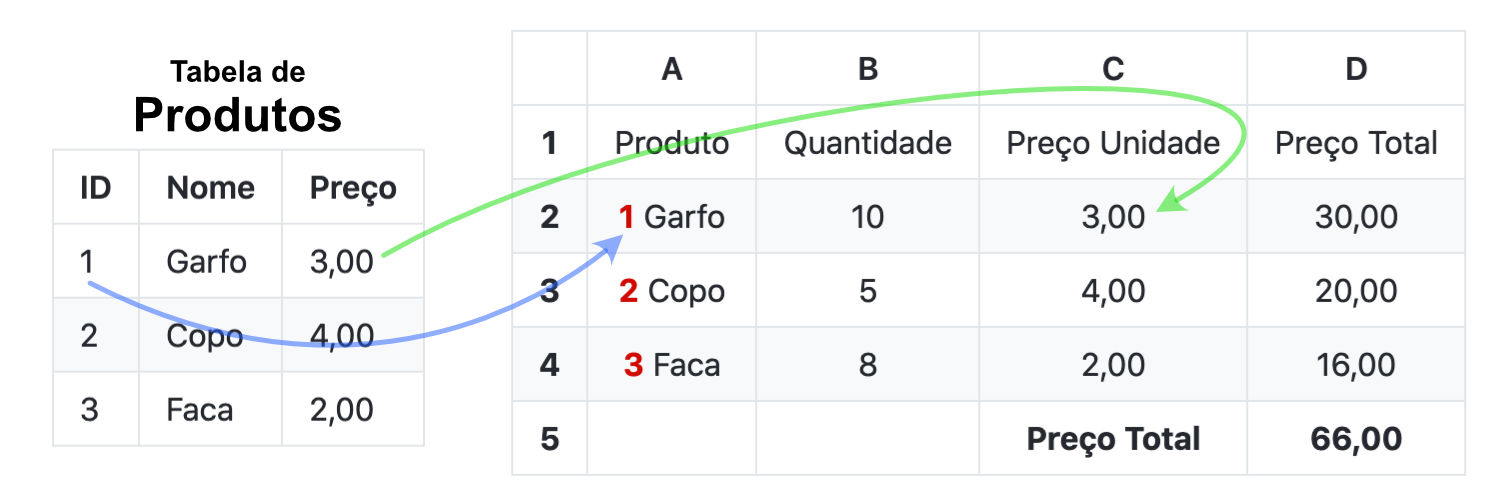
To store this information in a database, you need to create a table to store the Products information.
The table will be structured as in the example below and will contain the following data:
| Products | ||
|---|---|---|
| ID | Name | Price |
| 1 | Fork | 3.00 |
| 2 | Glass | 4.00 |
| 3 | Knife | 2.00 |
Therefore, whenever data from a Product is used, it must necessarily come from this table.
In other words, it is as if you had a spreadsheet that stores the Products information.
Each row contains an ID, a unique identifier, for example a sequential number.
To display the desired information again, the data referring to the Product will be provided by our Products table, as follows: